
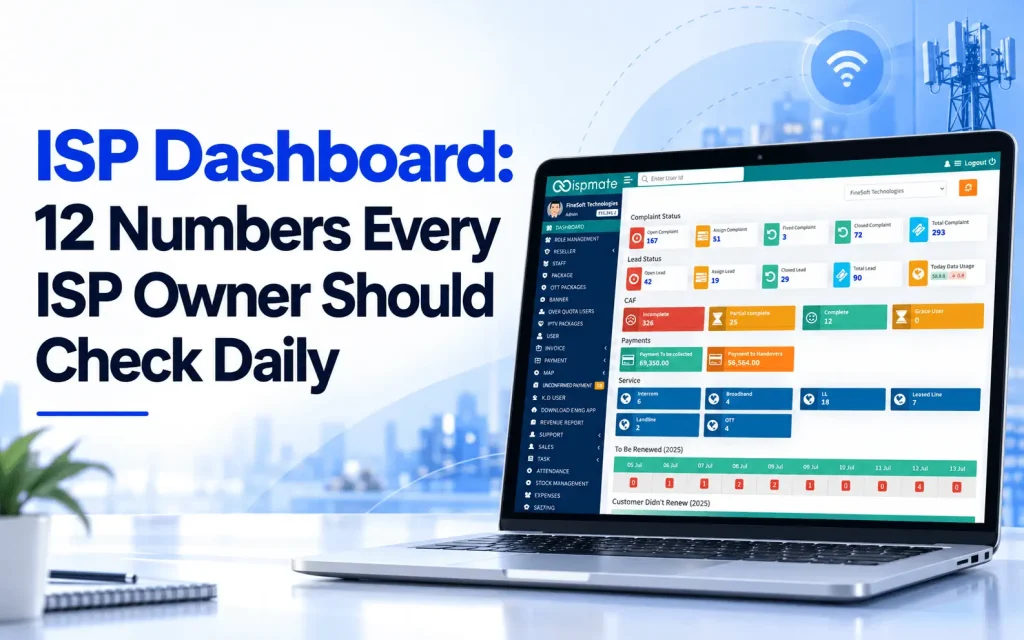
Most ISP owners know their business is doing well or badly only at the end of the month, when the collections are counted. By then, a missed renewal has already become a lost customer, and an unresolved complaint has already become a bad review.
A good ISP dashboard changes that. It puts the numbers that matter on one screen, so you can spend ten minutes every morning and know exactly where to act. Here are the 12 numbers worth checking every day, and what to do when each one looks wrong.
What is an ISP dashboard?
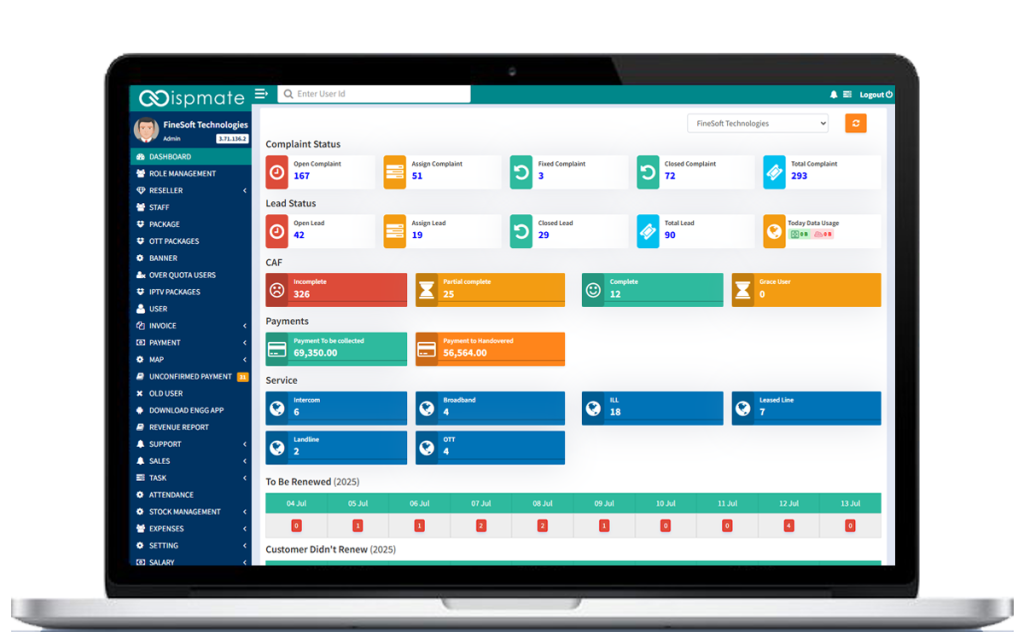
An ISP dashboard is the first screen your team sees after logging in to your ISP billing software. It shows live counts of complaints, leads, customer documents, payments, active services and upcoming renewals, pulled from the same system you use for billing and support. Because the data is live, you don’t need to build reports in Excel to know how the business is doing today.
Renewals and churn
1. Connections due for renewal
The number of subscribers whose plan expires today and in the next few days. This is the most important number on the dashboard, because every renewal you miss is revenue you have already earned walking away.
What to do: make sure reminders have gone out, and have your team call the subscribers who are due today and haven’t paid.
2. Customers who didn’t renew
Subscribers whose plan expired and who have not renewed. A rising count is the earliest warning sign of churn.
What to do: call these customers within a day or two. Ask why they didn’t renew. Often it is a forgotten payment, sometimes it is a complaint nobody solved, and occasionally it is a competitor’s offer.
Payments and collections
3. Payments to be collected
The total amount subscribers owe you right now. This tells you how much cash is still sitting outside the business.
What to do: sort by the largest dues and assign follow-ups. A short list of big defaulters is often worth more than a long list of small ones.
4. Payments to be handed over
Cash and cheques collected by field staff or resellers that haven’t yet been deposited or handed to the office. If this number keeps growing, money is being collected but not reaching you.
What to do: review it by collector every day, and set a rule for how long cash can stay with field staff.
Complaints and support
5. Open complaints
New complaints that nobody has picked up yet. A high number in the morning usually means the support team is behind.
6. Assigned complaints
Complaints given to an engineer but not yet fixed. Look for tickets that have been assigned for too long; they are the ones that turn into angry calls.
7. Fixed vs closed complaints
A complaint marked “fixed” by the engineer is not the same as one “closed” after the customer confirms. If many tickets are fixed but not closed, customers may still be facing the problem.
What to do: call back a few “fixed” customers each day to confirm, and close the ticket only when they agree. Read more in our guide to choosing the best ISP billing software, which covers complaint workflows.
Sales and onboarding
8. Open leads
New connection enquiries that nobody has contacted yet. A lead that waits a day often signs up with someone else.
9. Assigned and closed leads
How many leads your sales team is working on and how many became connections. If many leads are assigned but few are closed, the problem is follow-up, not demand.
10. Incomplete CAF
New subscribers whose customer application form or KYC documents are missing or only partly complete. Incomplete CAFs are a compliance risk, and they often mean the installation is waiting too.
What to do: send the list to your field team so documents are collected at the next visit.
Network and services
11. Active services by type
The count of active connections by service: broadband, leased line, ILL, intercom, landline, OTT and others. Watching these daily shows which services are growing and which are shrinking.
12. Today’s data usage
Total data used across your network today. A sudden spike or drop can point to a network issue, an outage in one area, or unusual usage by a few accounts.
A 10-minute morning routine
- Renewals first: check connections due today and customers who didn’t renew.
- Money next: look at payments to be collected and cash not yet handed over.
- Complaints: clear open tickets and chase the ones assigned too long.
- Sales: make sure every new lead has an owner.
- CAF and network: send incomplete CAFs to the field team, and glance at usage for anything unusual.
Do this every day for two weeks and you will notice patterns: which areas complain most, which collectors are slow, and which plans churn.
Why spreadsheets can’t do this
You can build some of these numbers in Excel, but only at the end of the day or week, and only if someone updates the sheet. A live dashboard shows them the moment a payment, complaint or lead comes in. If your team still builds reports by hand, read the 7 signs your ISP has outgrown Excel billing. And because subscribers can recharge and raise tickets themselves through an ISP customer portal, many of these numbers improve without extra work from your team.
Frequently asked questions
An ISP dashboard is a live summary screen in ISP software that shows renewals, dues, collections, complaints, leads, customer documents, active services and data usage in one place.
Connections due for renewal. Every missed renewal is earned revenue that walks away, and it is the easiest number to act on the same day.
Once every morning is enough for most ISPs. A ten-minute review of renewals, payments, complaints and leads catches most problems before they grow.
Yes. In ISPMate, numbers can be viewed across the whole business or for a single branch, so owners of multi-branch ISPs can see where to act.
See your numbers in ISPMate
ISPMate’s dashboard shows renewals, dues, complaints, leads, CAF status and services on one screen, connected to your billing and RADIUS. Book a free demo to see it with your own data: call +91-9310313545 or write to sales@ispmate.com.